Glass Morph Powerpoint Template: Futuristic Design for Modern Professionals
In the crowded world of digital presentations, a generic slide deck can cause your message to blend into the background noise. For professionals—from entrepreneurs and marketers to designers and small business owners—the visual quality of your presentation directly influences how your ideas are received. The Glass Morph Powerpoint Template offers a distinct solution, moving beyond basic layouts to provide a sophisticated, modern aesthetic that commands attention and enhances professionalism.
Understanding the Glass Morph Aesthetic
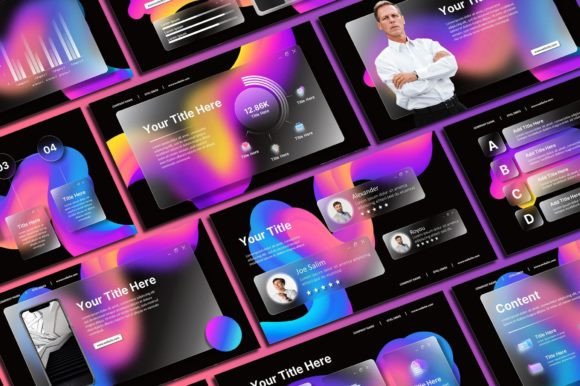
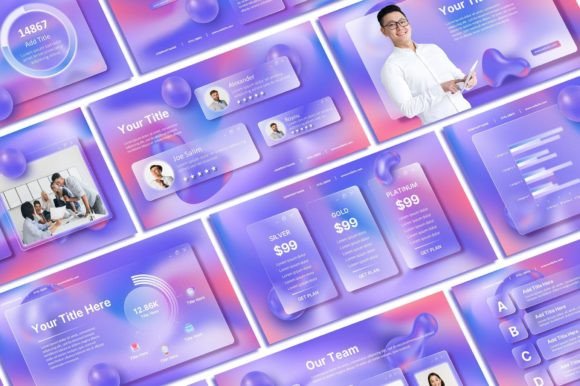
At its core, the Glass Morph Powerpoint Template draws inspiration from the "glassmorphism" trend in UI and graphic design. This style is characterized by semi-transparent backgrounds, subtle blurs, and layered elements that create a sense of depth and dimension. Imagine frosted glass panels floating over a vibrant, gradient background; that is the visual personality of this template. It feels clean, futuristic, and technologically advanced, making it an excellent fit for industries like tech, finance, marketing, and creative agencies where a cutting-edge image is valuable.
This isn't just about looking pretty. The transparency and layering in the Glass Morph Powerpoint Template serve a functional purpose in visual hierarchy. Important text and data points are placed on these frosted panels, ensuring they stand out against the background without feeling disconnected. This approach guides the viewer's eye naturally, improving readability and information retention. For a brand, adopting this style can signal innovation and attention to detail, subtly shaping audience perception before you even speak.
Practical Applications and Real-World Value
Where does a template like this truly shine? Its strength lies in presentations where you need to convey complex information with clarity and a modern edge. Think quarterly business reviews for stakeholders, product launch pitches, investor decks, or keynote speeches at conferences. The clean, uncluttered layouts prevent cognitive overload, while the unique visual style makes your presentation memorable. For content creators and bloggers, this template can transform webinar slides or online course materials, providing a professional studio-quality feel that builds trust with your audience.
The practical value extends to its comprehensive package. With 50 unique animated slides, you have a versatile toolkit for any narrative flow. The inclusion of over 400 free icons is a significant time-saver, allowing you to visually represent concepts, processes, and data points without hunting for external assets. All graphics are resizable and editable, giving you full control to adapt the template to your specific brand colors and imagery. This level of customization is crucial for maintaining brand consistency across all your materials.
Implementing the Template Effectively
Getting started is straightforward, but a few best practices will ensure you maximize its impact. After purchasing and downloading the PowerPoint file, take time to install the recommended fonts. This step is often overlooked, but it ensures the text renders exactly as the designer intended, preserving the intended visual hierarchy and professionalism. Next, consider your color palette. While the template comes with a preset scheme, you can and should adapt it. Replace the placeholder colors with your brand's primary and secondary colors to create instant recognition.
When editing, leverage the layered structure. Use the transparent panels to highlight key statistics or quotes. The animations are subtle and professional; use them to reveal points sequentially rather than for flashy distraction. A common pitfall is overcrowding slides. The power of the glass morph design is its breathing room. Trust the layout and keep text concise. For those working on brand identity, this template provides a fantastic foundation for a consistent visual language that can extend beyond the presentation to other digital assets.
Evaluating Fit and Final Considerations
Is the Glass Morph Powerpoint Template the right choice for your project? Evaluate your audience and context. It excels in corporate, tech, and creative settings but might feel too stylistic for very traditional industries like law or banking. The requirement for Microsoft PowerPoint or Excel is standard, but ensure you're comfortable with basic slide editing. The 16:9 aspect ratio is now the standard for modern displays and projectors, ensuring your presentation looks sharp in most environments.
Remember the terms of use. This is a premium design asset copyrighted by Sky Creation for personal use. You cannot resell or redistribute the template itself. However, you are free to use it to create unlimited presentations for your personal projects, client work (as a finished product), and business needs. This makes it a valuable investment for freelancers and agencies who produce frequent presentations. By choosing a template like this, you're not just buying slides; you're investing in a polished, professional framework that elevates your communication and helps your ideas stand out in a visually saturated world.